














• About
  • Sponsor
  • Privacy Policy
  • DMCA
  • Contact
  • Login
  • Register
Thursday, June 18, 2026
TechTalk with Tahmid
  • Home
  • Tech News

    **AI’s rapid evolution and its societal impacts** is dominating the tech world, sparking debates on everything from job displacement to ethical governance.

    “Cut through the AI hype: Discover the practical tools and strategies you *actually* need to leverage generative AI for real-world impact without getting overwhelmed.”

    “Cut through the AI hype: Discover the practical tools and strategies you *actually* need to leverage generative AI for real-world impact without getting overwhelmed.”

    **From new AI-powered PCs to increasingly sophisticated LLMs, the biggest tech trend is how quickly generative AI is becoming less a novelty and more an indispensable, transformative force in our daily work and lives.**

    **Unpack practical, immediate ways to leverage the rapidly evolving world of generative AI to boost your personal and professional productivity today.**

    **Unpack practical, immediate ways to leverage the rapidly evolving world of generative AI to boost your personal and professional productivity today.**

    **Generative AI is no longer a futuristic fantasy – it’s your everyday co-pilot, fundamentally changing how we work, create, and interact with information.**

    **Beyond the hype: Discover how the latest generative AI tools are *actually* transforming daily workflows and what it means for *your* productivity right now.**

    As AI rapidly integrates into every facet of our lives, the real question isn’t *what* it can do, but *how* we’ll adapt to a fundamentally reshaped world.

  • Tutorial
    Manual WordPress Website Migration Guide: Step-by-Step

    Manual WordPress Website Migration Guide: Step-by-Step

    Proxmox Device Passthrough Guide: USB & Hard Disk Setup

    Proxmox Device Passthrough Guide: USB & Hard Disk Setup

    How to Setup Proxmox Backup and Restore Using ZFS

    How to Setup Proxmox Backup and Restore Using ZFS

    Proxmox LXC Setup Guide (2026)

    Proxmox LXC Setup Guide (2026)

    Proxmox VE Virtual Machine Creation Guide (2026)

    Proxmox VE Virtual Machine Creation Guide (2026)

    Proxmox VE Storage Configuration & Networking Guide: RAID & ZFS Setup (2026)

    Proxmox VE Storage Configuration & Networking Guide: RAID & ZFS Setup (2026)

    Proxmox VE Post-Installation Guide & UI Walkthrough (2026)

    Proxmox VE Post-Installation Guide & UI Walkthrough (2026)

    Proxmox Installation Guide: How to Turn Your Old PC into a Powerful Server?

    Proxmox Installation Guide: How to Turn Your Old PC into a Powerful Server?

    How to Install Ubuntu Using an USB Pendrive

  • Server
    • All
    • Proxmox Server
    • Web Server
    Manual WordPress Website Migration Guide: Step-by-Step

    Manual WordPress Website Migration Guide: Step-by-Step

    Proxmox Device Passthrough Guide: USB & Hard Disk Setup

    Proxmox Device Passthrough Guide: USB & Hard Disk Setup

    How to Setup Proxmox Backup and Restore Using ZFS

    How to Setup Proxmox Backup and Restore Using ZFS

    Proxmox LXC Setup Guide (2026)

    Proxmox LXC Setup Guide (2026)

    Proxmox VE Virtual Machine Creation Guide (2026)

    Proxmox VE Virtual Machine Creation Guide (2026)

    Proxmox VE Storage Configuration & Networking Guide: RAID & ZFS Setup (2026)

    Proxmox VE Storage Configuration & Networking Guide: RAID & ZFS Setup (2026)

    Proxmox VE Post-Installation Guide & UI Walkthrough (2026)

    Proxmox VE Post-Installation Guide & UI Walkthrough (2026)

    Proxmox Installation Guide: How to Turn Your Old PC into a Powerful Server?

    Proxmox Installation Guide: How to Turn Your Old PC into a Powerful Server?

  • PC
  • Smartphone
No Result
View All Result
TechTalk with Tahmid
  • Home
  • Tech News

    **AI’s rapid evolution and its societal impacts** is dominating the tech world, sparking debates on everything from job displacement to ethical governance.

    “Cut through the AI hype: Discover the practical tools and strategies you *actually* need to leverage generative AI for real-world impact without getting overwhelmed.”

    “Cut through the AI hype: Discover the practical tools and strategies you *actually* need to leverage generative AI for real-world impact without getting overwhelmed.”

    **From new AI-powered PCs to increasingly sophisticated LLMs, the biggest tech trend is how quickly generative AI is becoming less a novelty and more an indispensable, transformative force in our daily work and lives.**

    **Unpack practical, immediate ways to leverage the rapidly evolving world of generative AI to boost your personal and professional productivity today.**

    **Unpack practical, immediate ways to leverage the rapidly evolving world of generative AI to boost your personal and professional productivity today.**

    **Generative AI is no longer a futuristic fantasy – it’s your everyday co-pilot, fundamentally changing how we work, create, and interact with information.**

    **Beyond the hype: Discover how the latest generative AI tools are *actually* transforming daily workflows and what it means for *your* productivity right now.**

    As AI rapidly integrates into every facet of our lives, the real question isn’t *what* it can do, but *how* we’ll adapt to a fundamentally reshaped world.

  • Tutorial
    Manual WordPress Website Migration Guide: Step-by-Step

    Manual WordPress Website Migration Guide: Step-by-Step

    Proxmox Device Passthrough Guide: USB & Hard Disk Setup

    Proxmox Device Passthrough Guide: USB & Hard Disk Setup

    How to Setup Proxmox Backup and Restore Using ZFS

    How to Setup Proxmox Backup and Restore Using ZFS

    Proxmox LXC Setup Guide (2026)

    Proxmox LXC Setup Guide (2026)

    Proxmox VE Virtual Machine Creation Guide (2026)

    Proxmox VE Virtual Machine Creation Guide (2026)

    Proxmox VE Storage Configuration & Networking Guide: RAID & ZFS Setup (2026)

    Proxmox VE Storage Configuration & Networking Guide: RAID & ZFS Setup (2026)

    Proxmox VE Post-Installation Guide & UI Walkthrough (2026)

    Proxmox VE Post-Installation Guide & UI Walkthrough (2026)

    Proxmox Installation Guide: How to Turn Your Old PC into a Powerful Server?

    Proxmox Installation Guide: How to Turn Your Old PC into a Powerful Server?

    How to Install Ubuntu Using an USB Pendrive

  • Server
    • All
    • Proxmox Server
    • Web Server
    Manual WordPress Website Migration Guide: Step-by-Step

    Manual WordPress Website Migration Guide: Step-by-Step

    Proxmox Device Passthrough Guide: USB & Hard Disk Setup

    Proxmox Device Passthrough Guide: USB & Hard Disk Setup

    How to Setup Proxmox Backup and Restore Using ZFS

    How to Setup Proxmox Backup and Restore Using ZFS

    Proxmox LXC Setup Guide (2026)

    Proxmox LXC Setup Guide (2026)

    Proxmox VE Virtual Machine Creation Guide (2026)

    Proxmox VE Virtual Machine Creation Guide (2026)

    Proxmox VE Storage Configuration & Networking Guide: RAID & ZFS Setup (2026)

    Proxmox VE Storage Configuration & Networking Guide: RAID & ZFS Setup (2026)

    Proxmox VE Post-Installation Guide & UI Walkthrough (2026)

    Proxmox VE Post-Installation Guide & UI Walkthrough (2026)

    Proxmox Installation Guide: How to Turn Your Old PC into a Powerful Server?

    Proxmox Installation Guide: How to Turn Your Old PC into a Powerful Server?

  • PC
  • Smartphone
No Result
View All Result
TechTalk with Tahmid
No Result
View All Result

Home | Blog | Proxmox Device Passthrough Guide: USB & Hard Disk Setup

Proxmox Device Passthrough Guide: USB & Hard Disk Setup

by Tahmidul Haque
June 18, 2026
149
A A
0
Proxmox Device Passthrough Guide: USB & Hard Disk Setup
Share on FacebookShare on TwitterShare on TwitterShare on PinterestSend via Email

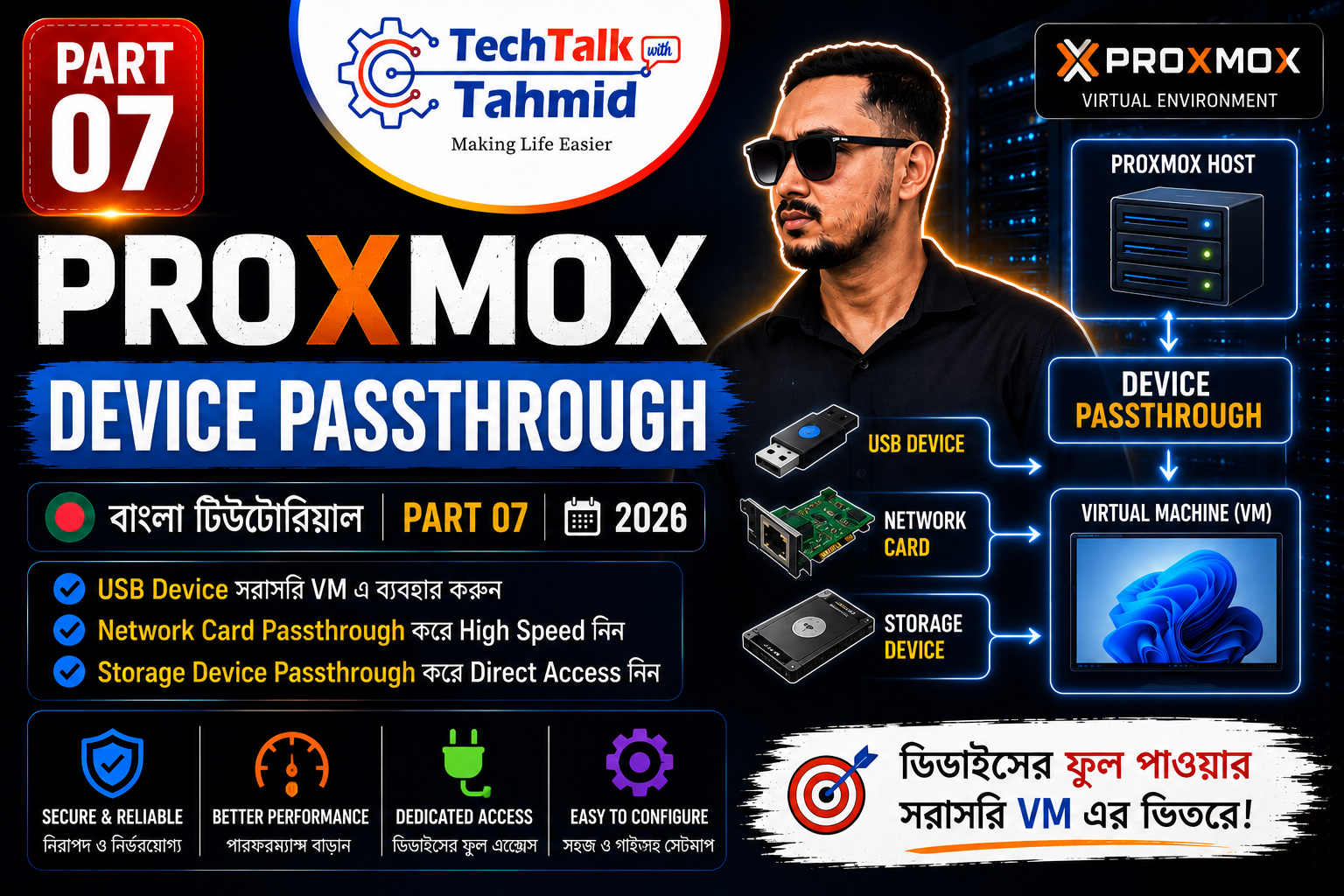
Welcome to Final Part of our Proxmox Virtualization series. Today, we are covering a highly requested advanced data storage integration topic: implementing a complete Proxmox Device Passthrough process. In this step-by-step tutorial, you will learn how to bypass hypervisor extraction lines and assign dedicated physical USB connectors and raw storage disks directly to your virtual environments.


What is Proxmox Device Passthrough?

When you attach hardware directly to a server node, the host environment manages its allocations. To connect a Virtual Machine (VM) to that device, software abstraction frameworks must duplicate files across the path, which limits data stream boundaries and increases host processor cycles.

A true Proxmox Device Passthrough routine cuts out the hypervisor completely. It locks onto the physical hardware controller component and routes it straight into the target machine framework. The virtual instance handles the device as if it were natively connected to a physical motherboard socket.

Core Benefits of Device Bypassing:

  • Maximum Read/Write Speeds: Eliminates virtualization latency, enabling bare-metal block array speeds.
  • Perfect for NAS Architectures: Critical for TrueNAS Core or OpenMediaVault virtual environments that require direct hardware smart metrics monitoring.
  • Specialized Compute Allocation: Allows you to route specialized processing elements, such as PCIe graphics processing units (GPU passthrough) or heavy external storage arrays.

How to Setup Proxmox Device Passthrough for USBs

Mapping external USB equipment (such as flash controllers, portable drives, or multi-bay drive docking boxes) is simple and can be completed through the web control dashboard layer.

  1. Connect your external USB docking line or backup storage device directly to the physical server interface port.
  2. Log into your dashboard, view the navigation hierarchy pane, and choose the target offline Virtual Machine.
  3. Click on the Hardware settings tab from the secondary column view.
  4. Click on the upper toolbar action menu marked Add and select USB Device from the drop-down listings.
  5. Inside the parameter wizard menu, select the option labeled Use USB Vendor/Device ID. This unique protocol tells the server to map the structural device profile ID instead of a static slot path. If you reposition the hardware into a different socket interface later, your server tracks it automatically.
  6. Select the targeted storage controller profile row from the printed identification list and click Add.
  7. Fire up your VM instance. The guest host platform will instantly print out the connected volume.

How to Setup Proxmox Device Passthrough for Hard Disks

Passing raw physical disk blocks through into an isolated virtualization node requires custom parameters configuration through the web terminal shell interface to pull permanent storage markers.

Step 1: Identifying the Unique Disk Serial ID

Mapping raw hard drives using generic device names (such as /dev/sdb or /dev/sdc) is risky. If you slide in a temporary flash device or swap a diagnostic line later, the host letter assignments index will change, breaking your virtual environment pathways. We must utilize the permanent disk identification hash mapping matrix instead.

  1. Select your parent host server execution Node on the left column list tree.
  2. Open the secure web-based console dashboard terminal by clicking on the Shell option block.
  3. Execute the following disk enumeration identifier listing terminal command line string:
    ls -l /dev/disk/by-id/
  4. Locate the clean data row blocks referencing your unassigned hard drives (they will resolve out to structural trace points like ../../sdb or ../../sdc).
  5. Highlight and copy the complete static drive identification token string value (for example: ata-Orico_Hard_Drive_Disk_Serial_XYZ123).

Step 2: Executing the Virtual Disk Mapping Command

With the exact drive token copied, we will use the host environment’s execution engine tool line string to pass the target disk parameters into our virtual node space.

  1. Verify the exact numeric identification tag sequence assigned to your target Virtual Machine (for example: 105).
  2. Review your VM’s existing device table rows inside the hardware options index to identify free controller slot points. Since scsi0 holds your main boot operating system drive, use scsi1 or scsi2 for secondary mappings.
  3. In your node console shell terminal window, type out the storage block pass-through allocation command string below:
    qm set 105 -scsi1 /dev/disk/by-id/YOUR_COPIED_DISK_ID
  4. Replace YOUR_COPIED_DISK_ID with your copied hardware token line data and hit **Enter**.
  5. Return to the target machine’s Hardware tab page index. You will see a new raw physical hard drive entry listed alongside the scsi1 controller lane descriptor tag.

Boot up your target virtual operating system console. Your raw disk allocation boundaries will show up as unallocated direct local resources, ready to build multi-terabyte arrays at full hardware performance metrics.


Conclusion

You have successfully implemented a clean Proxmox device passthrough configuration across physical USB blocks and raw hard drive controllers. This finishes our core masterclass guide segments. You are now equipped with the technical skills to manage custom virtual networks, deploy thin provisioning pools, handle automated cloud protection schemas, and manage raw server hardware links.

Stay tuned for our upcoming specialized deployment series! To see the exact CLI terminal commands executed in real-time on real hardware, check out the tutorial video guide reference link down below:

Tags: homelabproxmoxservertutorial
Next Post
Manual WordPress Website Migration Guide: Step-by-Step

Manual WordPress Website Migration Guide: Step-by-Step

Please login to join discussion

Recommended.

Proxmox Device Passthrough Guide: USB & Hard Disk Setup

Proxmox Device Passthrough Guide: USB & Hard Disk Setup

June 18, 2026
Proxmox VE Post-Installation Guide & UI Walkthrough (2026)

Proxmox VE Post-Installation Guide & UI Walkthrough (2026)

June 11, 2026

Trending.

No Content Available
TechTalk with Tahmid

TechTalk with Tahmid is a tech blog that provides informative and engaging content on a variety of topics, including software development, web design, and cybersecurity.

Follow Us

Categories

  • Linux
  • Operating System
  • Proxmox Server
  • Server
  • Tech News
  • Tech Tips
  • Tutorial
  • Ubuntu
  • Uncategorized
  • Web Server
  • windows

Tags

cPanel homelab installation linux migration OS post install proxmox raid server tutorial ubuntu Web Server windows10 wordpress

Recent News

Manual WordPress Website Migration Guide: Step-by-Step

Manual WordPress Website Migration Guide: Step-by-Step

June 18, 2026
Proxmox Device Passthrough Guide: USB & Hard Disk Setup

Proxmox Device Passthrough Guide: USB & Hard Disk Setup

June 18, 2026
  • About
  • Sponsor
  • Privacy Policy
  • DMCA
  • Contact

© 2023 TechTalk with Tahmid - All Rights Reserved.

No Result
View All Result
  • Home
  • Tech News
  • Tutorial
  • Server
    • Cloud Server
    • Docker
    • Mail Server
    • Media Server
    • NAS server
    • VPN Server
    • VPS
    • Web Server
  • PC
    • Hardware
    • Software
  • Smartphone
    • Android
    • iOS
    • Other OS
  • Login
  • Sign Up

© 2023 TechTalk with Tahmid - All Rights Reserved.

Welcome Back!

Sign In with Facebook
Sign In with Google
OR

Login to your account below

Forgotten Password? Sign Up

Create New Account!

Sign Up with Facebook
Sign Up with Google
OR

Fill the forms below to register

*By registering into our website, you agree to the Terms & Conditions and Privacy Policy.
All fields are required. Log In

Retrieve your password

Please enter your username or email address to reset your password.

Log In

Add New Playlist

This website uses cookies. By continuing to use this website you are giving consent to cookies being used. Visit our Privacy and Cookie Policy.
Go to mobile version